
Deployment and updates
The fleet is deployed with colmena 🡕: a single command builds and applies the configuration on one or more hosts, remotely, from the admin workstation.
Apply a configuration
Section titled “Apply a configuration”just apply <target> [action] # alias : a- target = hostname, pattern (
'*'), list (a,b) or colmena tag (@server). - action =
switch(default),boot,testorbuild.
| Command | Purpose |
|---|---|
just apply <target> | Build + activate on the target(s) |
just apply-local | Apply on the current machine (alias al) |
just apply-verbose <target> | Same as apply in trace mode (alias av) |
Deploy safely
Section titled “Deploy safely”Build confidence through action: each step is less risky than the next.
just apply <host> build # downloads + compiles: 100% safe, nothing is activatedjust apply <host> test # activates without switching: no generation, no bootjust apply <host> # switch: activates and creates a new generationProgress from core to edge: deploy nodes in this order, to never cut off access to a node by the one preceding it.

Updating
Section titled “Updating”The system is locked down by flakes. Updating = refreshing the inputs, then redeploying.
just update-flake # met à jour dnf/ + racine, commit les locksjust apply '*' # déploie la mise à jourUpdating the fleet with fleet-update
Section titled “Updating the fleet with fleet-update”fleet-update chains the entire update into a single command : flakes,
building all hosts, publishing the locks across the fleet, testing in waves
(hosts the network depends on first), then final activation of the approved
hosts.
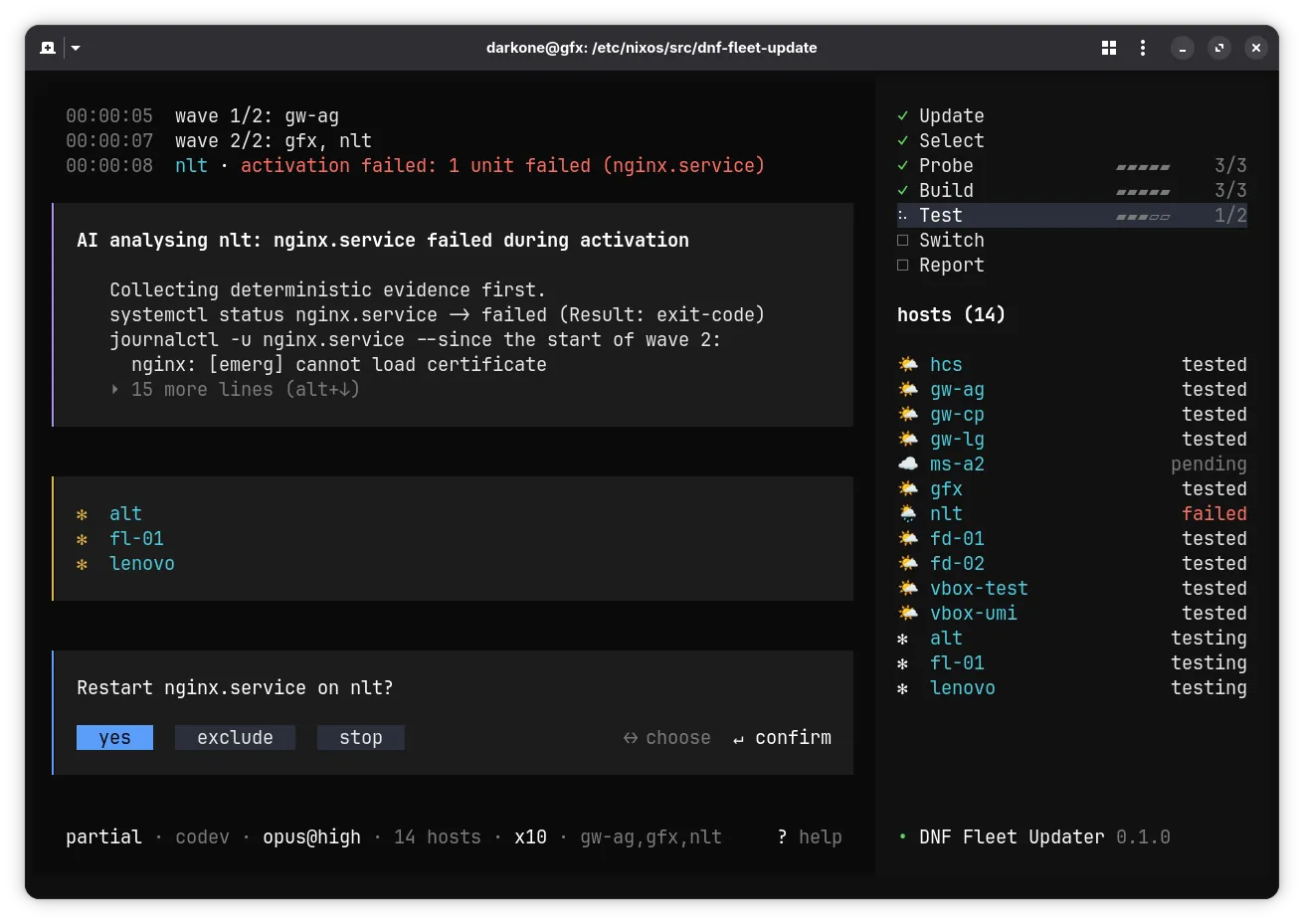
Launch
Section titled “Launch”just fleet-update [options]The recipe picks the tool to run, in this order :
| Situation | Tool run |
|---|---|
Co-development (src/dnf-fleet-update/ present) | The sources, with bun |
Active darkone.admin.fleet-update module | The installed fleet-update command |
| Any other case | nix run .#fleet-update, per the project’s flake.lock |
How a rollout unfolds
Section titled “How a rollout unfolds”- Update:
nix flake updatefor the project, then fordnf/(co-development),just clean, one commit per repository. - Selection: hosts, profiles and zones read from
var/generated/, filtered by--on; the current zone deduced from the local IP; one builder elected per host. - Build: all selected hosts, reachable or not, each on its own builder. Presence probed through the deployment SSH connection, which also joins a roaming host.
- Publication: the closure of each reachable host is brought into its store, outside waves, before any activation.
- Test:
switch-to-configuration test, one wave per profile; the next wave starts once all its hosts are OK or set aside. - Switch: all hosts validated in test, in a single go, out of wave order.
Three options shorten this sequence :
| Option | Effect |
|---|---|
--build-only | Stops after the build; in interactive mode, offers to continue |
--skip-test | No test: the switch happens wave by wave, right after the build |
--skip-switch | No switch: the rollout stops at whatever the test left in place |
Distributed builds
Section titled “Distributed builds”The deployment machine must not become the bottleneck of the fleet. Each host is
therefore built by the builder elected for it. The election is recalculated on
each run from var/generated/, never declared : changing the deployment
topology must not rebuild the fleet.
| Order | Builder selected | Condition |
|---|---|---|
| 1 | The host itself | auto-build or roaming feature |
| 2 | The harmonia host of its zone | The zone has one |
| 3 | The global harmonia host | One exists in the fleet |
| 4 | The deployment machine | Default |
The rule comes down to one sentence : a builder must be able to serve what
it builds. Hence the choice of harmonia hosts, whose /nix/store is already
their zone’s cache, with nothing to prime. A gateway without harmonia does not
suit : its paths are in no substituter.
The result stays on the builder. It is the deployment that then brings it to the zone’s hosts, over the LAN, through their usual substituter.
features: ["auto-build"]The --no-distributed-build option brings everything back to the center,
whatever the election. It is a debugging escape hatch : the rule comes from
the fleet, the exception from the command line.
Wave order and critical hosts
Section titled “Wave order and critical hosts”The fleet’s default values are declared in config.yaml :
network: fleetUpdate: deploymentOrder: "hcs:gateway:server:[others]:laptop" criticalProfiles: "hcs:gateway:server"| Key | Role |
|---|---|
deploymentOrder | One test wave per host profile, in that order |
criticalProfiles | Profiles whose failures also go to the incident room |
Profiles separated by :, [others] designates the unlisted profiles. Optional block : without it, the tool applies the values above. The --deployment-order and --critical-profiles options take precedence over config.yaml.
Timing and monitoring
Section titled “Timing and monitoring”Two other optional blocks in config.yaml set the durations :
network: fleetUpdate: pingInterval: 15 timeouts: build: 10800 ssh: 30| Key | Role | Default |
|---|---|---|
pingInterval | Seconds between two presence probes | 15 |
timeouts.<key> | Maximum duration of an operation, in seconds | depends on the operation |
timeouts keys, in the order of the rollout :
timeouts.<key> | Default (s) |
|---|---|
flakeUpdate | 120 |
clean | 60 |
commit | 60 |
eval | 1200 |
build | 10800 |
publish | 3600 |
copy | 3600 |
activation | 300 |
ssh | 30 |
ping | 5 |
matrix | 30 |
killGrace | 10 |
Errors, diagnostics and repair
Section titled “Errors, diagnostics and repair”A common error should be readable without knowing Nix. The tool keeps a signature table: a recognized pattern in a command’s output gives a plain-language message and the action to take.
| Recognized pattern | What it means | Action |
|---|---|---|
mismatch in field 'narHash' | nix-eval-jobs isn’t bound to the same Nix as the system | Stop |
lacks a signature by a trusted key | The deployment account isn’t a trusted user on this host | Stop |
The message is shown as the run progresses (hint:), once only, and is also
found in the report’s Known errors section. It is added to the host’s reason,
it never replaces it: the full trace stays in logs/.
| Table action | What the tool does |
|---|---|
| Retry | Replays the command, at most three times, if it is replayable: evaluation, build, derivation copy, pull |
| Exclude | Continues without the host; if already activated, first brings it back to its origin |
| Stop | Stops the run, without asking any question |
No signature calls for a retry today: the two known entries are stops.
Deterministic collection. A host that fails while remaining reachable is
interrogated before any decision: systemctl status, list of failing units, then
each one’s log since the start of its wave.
| What is collected | Where it goes |
|---|---|
| Full output of commands and logs | logs/<hôte>.diag in the run folder |
| Failing units, error extract | Report’s Diagnostics section, incident message |
Unit restart. An activation that ends with failing units leaves the host in
error state. The tool then attempts a simple repair.
- Ten-second wait: a unit that is slow to start isn’t a failing unit.
systemctl restartof all the failing units, in a single command.- Re-reading the failing-unit list: it is what concludes, not the exit code.
Everything comes back up → the host resumes its course, rejoins the switch with
the others, and the report notes a probable activation-order issue
(Notes section). A unit resists → the host stays in error, its name and the
unit’s are in the report.
AI analysis
Section titled “AI analysis”AI explains a failure : it reads the deployment state, the logs and,
when needed, the code, then returns a plain-language analysis. With
--ai-error-action repair it can then act on the failed units, and nothing
else (see Repairing a service). The deployment never
waits for it — an analysis that fails, times out or exceeds its budget
leaves the host exactly where it was.
Two options drive it, both set to none by default : nothing goes to
an AI until you ask for it. A third one selects the tool.
| Option | Default | Role |
|---|---|---|
--ai-analysis none|passive|active | none | Analysis depth, plus an end-of-deployment summary in the report |
--ai-error-action none|analysis|repair | none | What AI does when a host fails |
--ai-model <tool>[:<model>][@<effort>] | claude:opus@high | Tool and model, for instance opencode:ollama/qwen3:32b |
--ai-context <text> | none | Instruction or context added to every AI prompt |
just fleet-update --ai-analysis passive # enriched report, nothing morejust fleet-update --ai-error-action analysis # every failure is explainedFor instance, --ai-context "Answer in French and stay concise." guides the
style of the answers. To avoid repeating it on every deployment, set it once
per host with the module’s aiContext option : it writes it to
/etc/fleet-update/ai-context, which every deployment reads, just fleet-update
as well as the timer. The --ai-context option takes precedence over that file.
When resuming, the context of the initial deployment is picked up ; an
explicit --ai-context replaces it.
# usr/machines/<host>/configuration.nixdarkone.admin.fleet-update.aiContext = "Answer in French and stay concise.";The fleet’s default model is set in config.yaml, the option takes
precedence :
network: fleetUpdate: aiModel: "claude:opus@high"AI tools are not a dependency of the tool. claude and opencode are
looked up in the PATH ; the module’s aiPackages option puts them there
for the daily deployment. Missing or declined → a warning in the
deployment log, a note in the report, and the rest of the run proceeds without
AI.
What AI is allowed to do
Section titled “What AI is allowed to do”AI has neither a shell nor free-form SSH. It only acts through
fleet-update tools, and the requested level determines the list it is
shown : what it does not see there, it cannot ask for.
| Level | Tools presented |
|---|---|
passive | Deployment state, host diagnostics, build and activation logs, grouped deployment warnings |
active, analysis | + reading, searching and listing code (project and dnf/), host units and logs (including user units), read-only |
repair | + one action on a host’s failed units, and editing the code that describes them |
The effective level is the highest of the two options : --ai-analysis passive --ai-error-action analysis gives active. The built-in tools of
claude and opencode are cut off, and the instructions those tools would
pick up in the project (CLAUDE.md, user settings) are neutralized : AI
only sees what we show it.
| Guardrail | Effect |
|---|---|
| Read path | Confined to the project and dnf/, after symlink resolution ; usr/secrets/ and .trash/ refused |
| Host, unit | Checked against the deployment table before any command |
| Excerpts | 200 log lines, 400 source lines, truncated at the end : the error is at the bottom |
| Timeout, budget | 300 seconds per analysis ; dollar budget for claude |
Every tool call leaves a trace — one line in the deployment log
(AI reads usr/modules/nginx.nix) and one line in logs/ai.log of the
deployment directory. A call refused by a guardrail is traced too, along with
its reason.
When it steps in
Section titled “When it steps in”- A host fails, with
--ai-error-action≠none: after deterministic collection and unit restart, before the question that decides its fate. The host showsAI analysisin magenta during that time, then returns to its state. - A host recovers after a unit restart, with
--ai-analysis≠none: the analysis explains the activation order, without touching the host’s state. - End of deployment, with
--ai-analysis≠none: a summary of everything, written before the report that carries it. - End of deployment, with
--ai-analysis active: a review of the warnings, which files improvement suggestions. akey, at any time : a free-form question. It gets an answer even under--ai-analysis none— with no tool at all:noneremoves the tools and automatic analysis, not the conversation.
Repairing a service
Section titled “Repairing a service”--ai-error-action repair opens a second session on the host, right after
the analysis and in the AI repair state. The first of its tools acts on
services: systemctl start, stop, restart or reset-failed on the
units the run saw fail. This is the gesture to prefer: it
is local and reversible. When it is not enough, the AI fixes the code
(Repairing through code).
just fleet-update --ai-error-action repair- The grouped deterministic restart failed: the host stays in
error. - The AI analyses, in the
AI analysisstate, read-only. - The AI repairs, in the
AI repairstate: it acts, then re-reads the failed units. - Nothing failing anymore → the host resumes its course and joins the switch. Otherwise → the usual question,
revert/keep/stop/rollback.
| Guard-rail | Effect |
|---|---|
| Units | Only those the collection saw failing on this host; any other is refused |
| Host | Refused if it is not currently being repaired: a read session never acts |
| Attempts | Three actions per host, refusals not counted; the fourth is refused |
| Stopping mid-run | A run that stops repairs nothing: it is a new operation |
| Confirmation | In interactive mode, a button question before each action: apply or skip |
In non-interactive mode (night timer, --no-ui), the action passes without asking.
It is strictly less risky than what the run already does without
witness: the deterministic repair restarts all the host’s
failed units.
Each action is counted, not just traced: it ends up in
state.json and in the AI repair section of the report, refusals included, with its
reason. A repaired host also carries a note in the report.
Repairing through code
Section titled “Repairing through code”When no restart can help, AI writes the fix in the project, validates it, commits it, and that host alone is rebuilt then redeployed.
edit_codereplaces an exact passage (present only once), or rewrites an entire file. The git tree must be clean before the first edit, and the diff goes intologs/ai.log.validateruns the project cleanup, then re-evaluates and rebuilds that host alone.commitwritesfix(<scope>): <subject>, the scope naming what the fix touches (fix(nginx): …). In co-development,dnf/is committed first, then the project and its realigned lock.- The host goes back to
builtwith its new path ; its wave serves it one more time: copy, activation, conclusion.
| Guardrail | Effect |
|---|---|
| Paths | The project, and dnf/ in co-development ; never usr/secrets/, .trash/, .git/, var/generated/, etc/config.yaml nor a *.lock |
| Outside co-development | dnf/ is a store path : writing to it is refused, and would have changed nothing anyway |
| Tree | Dirty before the first edit → refusal : a repair commit carries only the fix |
| Attempts | One attempt is a change. Validating and committing cost none, otherwise fixing would cost three times more than restarting |
| Hooks | Never bypassed : the commit goes through the repository gate like any other |
| Message | dnf/ is published : a framework commit naming a fleet host is refused |
Improvement suggestions
Section titled “Improvement suggestions”With --ai-analysis active, the deployment ends with a review of its
warnings : renamed or deprecated option, a change that would silence a
warning, an issue to investigate. AI proposes, it changes neither the code
nor the fleet.
- The warnings from all deployment logs are grouped by shape : the same one on ten hosts counts once. No warning → no review, nothing is paid.
- AI reads the suggestions already filed, then searches the code for where each warning comes from.
- Every useful finding becomes a
var/deployments/suggestions/<slug>.mdfile : what, where (file:line), why, and the proposed improvement. - The report’s Suggestions section lists what the deployment filed or reviewed. Nothing goes to Matrix : this is not an alert.
The files survive deployments. A finding that comes back does not rewrite
its file : only the Last seen and Runs header lines change.
# Replace a deprecated nginx option
- Status: open- First seen: 20260101T020000Z-full- Last seen: 20260108T020000Z-full- Runs: 4
The option is deprecated upstream: `usr/modules/web.nix:12`, …| To | Do |
|---|---|
| Silence a suggestion | Write Status: ignored in its header : it stays tracked, out of the report |
| Forget it | Delete the file : a finding that comes back starts from scratch |
| Apply it | Fix the code, then delete the file |
The scope follows the mode : in co-development, the project and dnf/ ;
otherwise the project alone (a finding that only the framework can fix is not
filed).
Report and Matrix alerts
Section titled “Report and Matrix alerts”Each deployment writes its directory under
var/deployments/<date>-<mode>/ :
report.md (the report), state.json (the state --resume picks up),
events.jsonl and the per-host logs. The path is displayed at the end of the
deployment.
The report details what the deployment actually did :
| Section | What it gives |
|---|---|
| Steps, Waves | Duration of each step, composition and duration of each wave |
| Builders | Who built what, including fallbacks |
| Copies | Per host: pulled paths and by which substituter, pushed paths, volume |
| Zones without a cache | Deployment zones that no harmonia serves |
| Hosts not deployed | Hosts left aside, and the reason |
| Diagnostics | Per failed host: failed units, then an excerpt of the error |
| Notes | What the deployment observed: probable activation order after a unit restart |
| AI analysis | AI analysis: one entry per analyzed host, then the deployment summary |
| AI repair | AI actions: host, action, outcome, and the reason for a refusal. A repair commit also appears in the header, Repaired in flight |
| Suggestions | Improvement suggestions filed or reviewed by the deployment, except the ignored ones |
| Known errors | Pitfalls recognized by the signature table, in plain language |
The --send-report option sends this report to the
alert bot rooms, installed beforehand by
just configure-alert-bot.
| Situation | Room | Content |
|---|---|---|
| Deployment finished | warnings | Summary : hosts by state, duration, known errors |
| Critical hosts not deployed | incidents | Separate message : hosts concerned, reasons and failed units |
| Stopped on error | incidents | Error that stopped the deployment, then the summary |
A host is critical when its profile is listed in criticalProfiles. After a
stop, the hosts left in test complete the incident message : a restart
would bring them back to their previous generation.
Only the end-of-deployment summary joins the message, never the per-host
analyses, and it is capped at six lines there : beyond that, the message
refers to report.md. An alert room is not a report.
The message reuses the report’s header, with the exit code in the title :
**Fleet Update Report** (1)
Error: srv-ag: activation failed
- Started at 2026-09-17 02:00:00 UTC, duration: 4m12s- Options: partial run, selection gw-*, test skipped, 10 in parallel- Hosts: 5 deployed (hcs, gw-ag, pc-ag, gw-cp, lt-cp), 1 failed (srv-ag)- Run stopped on errorDaily run
Section titled “Daily run”On the deployment host, the module installs the tool and, with timer.enable, runs fleet-update --no-ui every day :
# usr/machines/<hôte>/configuration.nixdarkone.admin.fleet-update = { enable = true; user = "admin"; aiContext = "Répondre en français et rester concis."; timer.enable = true;};| Option | Default | Role |
|---|---|---|
user | none | Project owner: git, age key, AI, Matrix |
workDir | /etc/nixos | Consumer project on disk |
aiContext | null | Context added to the AI prompts of every run on the host, written to /etc/fleet-update/ai-context, even without enable ; --ai-context overrides it |
timer.onCalendar | *-*-* 04:00 | Run time |
timer.extraArgs | [ ] | Options added to --no-ui, --send-report for example |
timer.timeout | 6h | Maximum duration of a run |
Binary cache
Section titled “Binary cache”Two services combine to avoid recompiling or re-downloading derivations oneach deployment.
| Service | Role |
|---|---|
harmonia | Serves the local, signed /nix/store directly to the hosts (LAN, or VPN if it is global). |
nix-cache | Per-zone nginx proxy that caches the public cache.nixos.org cache on the gateway. |
A harmonia host has a second role : it is the
elected builder of its zone, because it knows how to serve
what it builds.
A host queries these sources in the following order of priority. The first fetch from the Internet is thus shared across the whole zone.
| Priority | Source | Scope |
|---|---|---|
| 20 | The zone’s harmonia | LAN, what the zone has compiled |
| 35 | The zone’s nix-cache proxy | LAN, shared mirror of the public cache |
| 40 | cache.nixos.org directly | Safety net if the gateway is down |
| 45 | global harmonia | Last resort, over the VPN |
Build farm
Section titled “Build farm”Fetching a package and building it are two distinct needs. The binary cache above covers the first. For the second, a powerful host of the network can take on the long compilations of an administrative host.
Declare it with the build-farm feature:
features: ["build-farm"]Each administrative host then adds it to its nix.buildMachines, joined over
SSH by the deployment account nix. Nothing else to configure: the key and the
authorization are already in place across the whole fleet.